
Step 1: Long-press 'Auto' ➔ Panda Secret Settings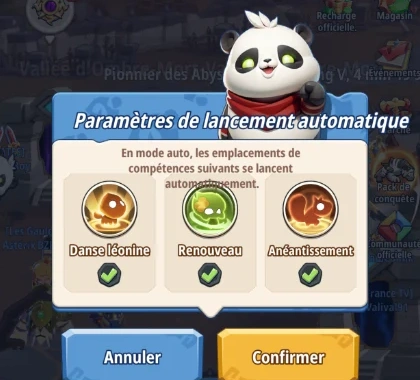
Step 2: In combat ➔ Selected skill highlighted in red!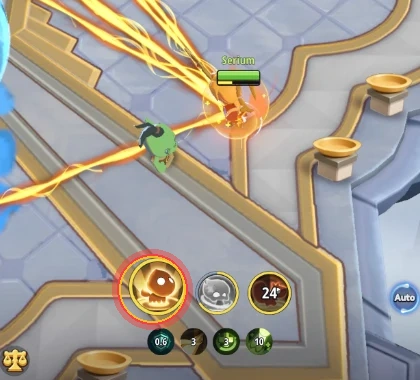
1. The Secret Trick: Long-press on the Auto button
Many players believe Auto-combat in *Whoa Adventure* is binary: either everything spams on cooldown, or everything is 100% manual.
Yet a hidden power feature exists: **press and hold (click and hold or long-press on mobile) the 'Auto' button** in the bottom right corner of your screen during gameplay or dungeons!
A special interface titled **'Auto-Cast Settings'** with the panda mascot immediately appears.
2. How to mix automated combat with manual timing?
In this dialog, the game displays your 3 equipped active skill slots:
- For example on a Healer or Mage: **Lion Dance**, **Renewal**, **Annihilation**.
- Each skill has a green toggle checkbox.
By unchecking a specific skill:
1. Checked skills continue to cast **automatically** as soon as off cooldown.
2. The unchecked skill becomes **purely manual**: you save it for the perfect tactical clutch moment!
3. Why this trick changes everything against Bosses and in Raids
This trick provides a massive edge in key encounters:
- **For Healers (Priest)**: Keep small buffs and damage spells on auto, but keep your **major emergency burst heal** or shield manual to save the tank when boss slams high AoE!
- **For Burst DPS (Assassin / Mage)**: Hold invulnerability or execution burst for vulnerability phases or telegraph dodges.
- **For Archer**: Avoid auto-spamming Heat-consuming skills to prevent entering the punitive Overheat state.
💡 Community Tip: Discovered another hidden secret or tactic? Share it with other players in our Discussion Forum!